Best Microphone for Small Desk Setups in 2026: Studio Power in Tight Spaces
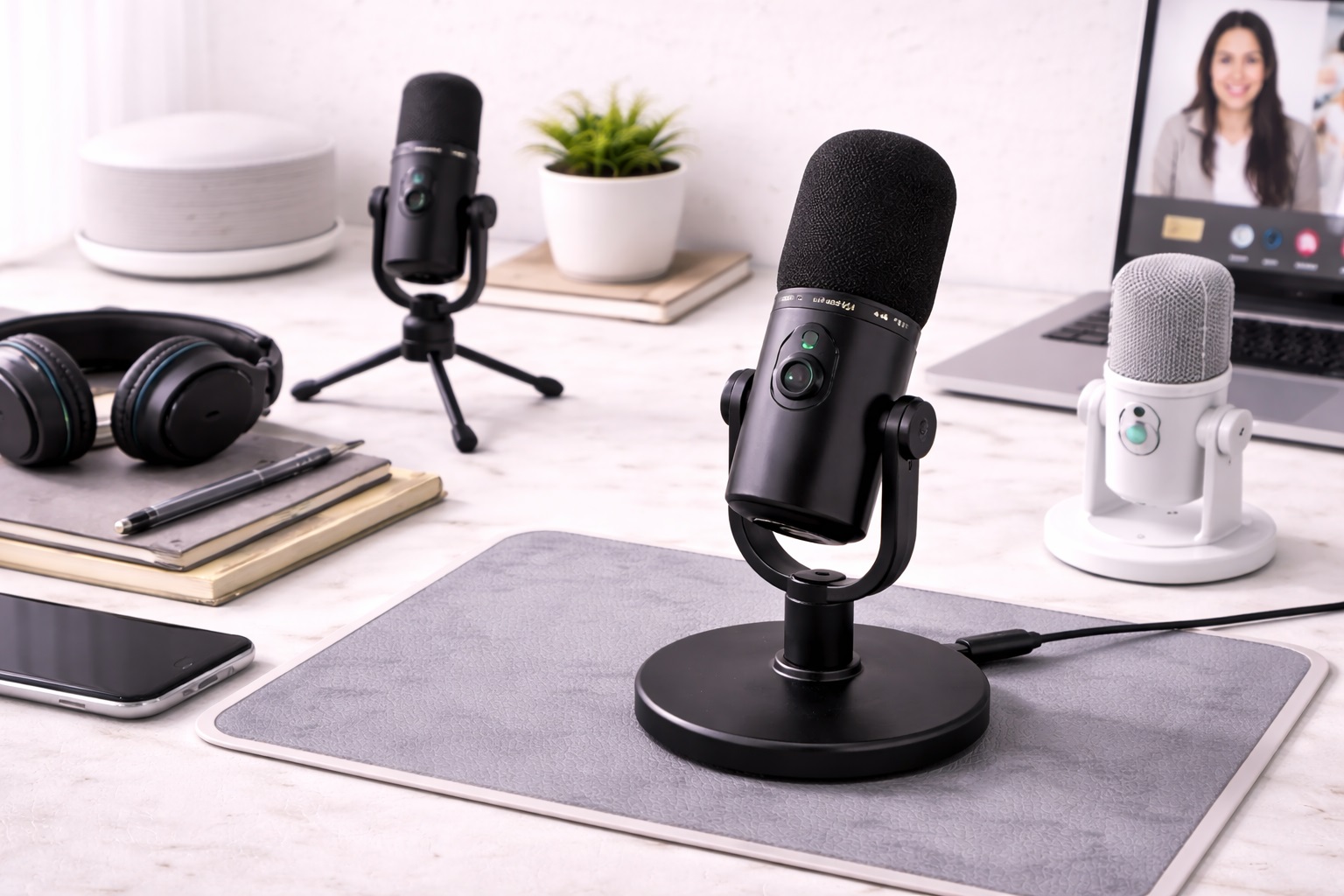
In 2026, the "Small Desk" movement has turned corners of living rooms, narrow hallways, and "cloffices" into high-powered workspaces. When your desk is only 30 or 40 inches wide, every centimeter of surface area is precious. A bulky microphone with a massive boom arm and long dangling cables can quickly clutter your minimalist setup and leave no room for your keyboard or mouse. The **best microphone for small desks** must be **Compact** (about the size of a soda can), **Directional** (ignoring the sounds of a nearby roommate or TV), and **Versatile** (often featuring built-in pop filters to save space).
We've tested the latest audio gear specifically for their "Physical Footprint" and how they integrate into a crowded layout. We looked for models with **Magnetic Bases**, **Integrated Pivot mounts**, and **"USB-C" connectivity** (allowing you to share one cable with your phone). Whether you're a minimalist student, a remote professional in a tiny apartment, or a streamer in a small booth, these are the top-rated picks for reclaiming your desk while maintaining your voice.
Top 8 Best Microphones for Small Workspaces (Detailed Reviews)
1. Razer Seiren Mini – The Absolute Minimalism Winner
Razer built the Seiren Mini specifically for "Minimalist Battlestations." It is about the size of a soda can and weighs almost nothing. For a small desk, its best feature is the **"Super-Cardioid" pickup pattern**—it is extremely focused on your voice and ignores the clicking of your keyboard or the sound of your fan. It features a "Set-It-and-Forget-It" design with zero buttons or knobs, ensuring your desk stays visually clean. It is available in stunning colors like Mercury White and Quartz Pink to match modern premium hardware.
- Pros: Smallest professional footprint, focused directional pickup, very affordable, beautiful colors.
- Cons: No physical mute button, mostly plastic construction.
Who should buy this: Gamers and students who want a highnd-quality upgrade that takes up literally 2 inches of desk space.
2. Rode NT-USB Mini – The Professional's Choice
Rode is the gold standard for audio, and the NT-USB Mini is their most compact "Studio" mic. For a small desk, its best feature is the **Magnetic Base**—it effortlessly detaches from its stand, allowing you to easily mount it to a tiny travel tripod or a monitor arm. It features a builtnd-in "Pop Filter" hidden inside the metal grill, eliminating the need for those bulky black circles that take up space. It provides a crystal clear, balanced sound and a very premium allnd-metal build.
- Pros: Best build quality on our list, internal pop filter, magnetic base, balanced professional sound.
- Cons: No physical gain (volume) knob, requires software for pro features.
Who should buy this: Professional remote workers and podcasters who want a tool that looks and sounds expensive but fits the minimalist aesthetic.
3. Shure MV6 – The Tech Specialist
Shure’s MV6 is designed for "The Modern Desk." For a small workspace, its best feature is the **Auto Level Mode**—the microphone has an internal brain that adjusts your volume in real-time, meaning you don't need a bulky "Mixer" or physical knobs on your desk. It features a "Digital Popper Stopper" that electronically removes the "P" and "B" thumping sounds. It features a touchnd-sensitive mute panel with a built-in LED light, giving you 100% control without any physical switches.
- Pros: AI-powered volume leveling, internal pop filter, touchnd-sensitive mute, famous Shure sound.
- Cons: Higher price tag, requires the "Motiv" app for pro features.
Who should buy this: Streamers and executives who take calls from different positions and want a "Technical" advantage without the clutter.
4. Blue Snowball iCE – The "Hidden" Legend
While technically round, the Snowball iCE features a "Removable Tripod" that is very narrow, allowing it to sit behind your laptop or tucked under a monitor stand. For a small desk, its best feature is its **"Set-and-Forget" simplicity**. It features a Cardioid pickup pattern and is "Skype/Discord Certified." While it is an older design, its natural sound makes it the best choice for recording acoustic instruments or singing in a small room. It provides a massive upgrade over internal mics for under $50.
- Pros: Very natural sound for music/voice, unique retro design, extremely reliable, affordable.
- Cons: Larger footprint (takes up desk space), uses older Mini-USB connection.
Who should buy this: Students and musicians who want a "Natural" sounding mic for a mix of voice and instruments in a quiet corner.
5. Rode VideoMic GO II – The "Monitor Top" Specialist
The GO II is a "Shotgun" microphone usually used for cameras, but for 2026, it is a favorite for small desks. Why? Because you can **mount it directly on top of your monitor**. This keeps it 100% OFF your desk surface. It is incredibly light (only 89 grams) and features a "Super-Cardioid" pickup pattern that ignores noise coming from the sides—perfect if you live in a noisy apartment. It requires zero batteries as it draws power from your laptop's USB port.
- Pros: ZERO desk footprint (monitor mounted), no batteries needed, directional shotgun focus, indestructible.
- Cons: Directional (you must point it at your face), doesn't record internally.
Who should buy this: Outdoor adventurers and desk minimalists who want a tool that can "disappear" during a video call.
6. Sennheiser Profile USB – The Design Master
Sennheiser’s Profile USB is a stunning, allnd-metal microphone that features an **Integrated Pivot**. For a small desk, its best feature is that it can "Tilt" to face you without needing a separate, bulky stand. It features a dedicated "Mute" button on the front with a LED ring that glows red when you are silent. It provides a very "Warm" and professional sound that is perfect for musicians and presenters. Its weighted base is small and heavy, ensuring it stays exactly where you put it.
- Pros: Stunning professional look, integrated tilting stand, "Mute" light, warm studio sound.
- Cons: Heavier than plastic models, requires a USB-C cable (not wireless).
Who should buy this: Designers and tech lovers who want a "Statement" piece that is also highly functional for professional calls.
7. HyperX SoloCast – The Stealth Specialist
HyperX built the SoloCast for gamers, but its slim, rotating stand makes it perfect for a crowded desk. For a small workspace, its best feature is the **Tap-to-Mute sensor** on the top—meaning you don't even have to look away from your screen to know if people can hear you. The stand is designed to tilt, allowing it to sit low under a monitor stand. It features Highnd-Resolution recording (24nd-bit) and is "Plug-and-Play" with zero software required for the base features.
- Pros: Tapnd-to-mute with LED light, highnd-res audio, very slim stand, durable.
- Cons: No internal pop filter (P-sounds can be loud), picks up some desk vibration noise.
Who should buy this: Gamers and Discord users who want a physical Mute status light and a "Stealth" look for their small setup.
8. Boya BY-PM500 – The "Monitor Arm" Hero
The PM500 is a heavier, professional mic that is best used with a **"Low-Profile Mic Arm"**. For a small desk, this is brilliant because the arm clamps to the back of the desk and "floats" the mic over your keyboard. It features a **"Dual Pickup" switch**, allowing you to record yourself or a whole meeting. It includes a builtnd-in headphone jack for "Zero-Lag" monitoring and a single knob that controls everything. It is a durable, all-metal tool for someone who wants to "Elevate" their audio gear off their desk.
- Pros: Two pickup patterns (Interviews vs. Solo), headphone monitoring, heavy-duty build, simple control.
- Cons: Larger and heavier than other picks, requires a separate arm for best space saving.
Who should buy this: Serious streamers and those who host meetings from a roundnd table and want a "Floating" desk setup.
Buying Guide: Maximize your Small Space
Choosing an audio tool for a crowded desk is about "Volume vs. Utility." Here are the four things to check:
1. "Dynamic" vs. "Condenser"
* **Dynamic (ATR2100x):** Best for small apartments. It ignores the TV in the next room and the traffic outside. * **Condenser (Rzer/Rode):** Best for quiet rooms. It sounds more "Natural" but will pick up every keyboard click on your small desk.
2. Mounting Options
On a small desk, "Surface Area" is your most expensive resource. Look for microphones with **Magnetic Bases** (Rode) or those that can be **Monitornd-Mounted** (Rode VideoMic). Alternatively, buy a $20 "Low-Profile" mic arm that clamps to the edge of your desk, reclaiming 100% of the desk surface beneath the mic.
3. Integrated Pop Filters
Internal pop filters (Rode NT-USB Mini, Shure MV6) are a "Small Desk Secret." They eliminate the need for those bulky black and mesh circles that take up visual space. This keeps your workspace looking "Clean" on video calls.
4. "Zero-Latency" Monitoring
Look for a mic with a **Headphone Jack on the bottom**. This allow you to plug your headphones directly into the mic, saving you from running another cord back to your laptop. This reduces "Cable Spaghetti" across your limited desk space.
FAQ: Small Desk Audio Hacks
How do I stop my mic from picking up my keyboard clicking?
On a small desk, the mic is usually very close to the keys. Use a **"Super-Cardioid"** mic (Razer) which points only at your face. Alternatively, put a **"Desk Mat"** (a large mousepad) under your keyboard—it absorbs the vibrations of the keys, making the clicks much quieter for the microphone.
Is "USB-C" better for a small desk?
Yes. USB-C is for 2026 what power strips were for 1990. It allow you to use the same backup cable as your phone or tablet, reducing the total Number of wires in your tiny desk drawer.
Do I need a "Shock Mount"?
Small desks are light and vibrate when you type. If you notice a "thumping" sound in your calls, you need a shock mount. Highnd budget mics like the **Rode NT-USB Mini** have a builtnd-in shock mount system that uses rubber bits to isolate the mic from the desk vibrations.
Can I use my laptop mic instead?
Yes, but it puts your face at a bad angle (looking down). It is much better to put your laptop on a **Stand** (at eye level) and use a separate, dedicated microphone. This is better for your posture and makes you sound 10X more professional on camera.
What do I do if I have too many cables?
Use **Velcro Ties** or **Cable Clips** to run your mic cable down the back of your monitor stand. On a small desk, "Invisible" cables are the key to a productive, stressnd-free mind.
Final Verdict: The Winner for Your Nook
- The Perfect Choice: The Razer Seiren Mini for its tiny footprint and focused pickup for a very low price.
- The Build King: The Rode NT-USB Mini for its professional metal build and magnetic base.
- The Feature Pro: The Shure MV6 for bringing AInd-powered volume control to a minimalist, sleek design.
Your workspace is a temple of focus. By choosing a microphone that respects your limited space, you're making your workday smoother, your desk clearer, and your voice more powerful. Speak with clarity!